Euler Home
This is a bit of a challenge in Euler Math Toolbox, since recursive algorithms fail due to limited recursive stack. So we need to emulate a stack approach.
First load an image.
>file="floodfill-test.png";
>A=loadrgb(file); insrgb(A);

The following function contains the algorithm. We fill a stack S with positions, backtracking along the stack if the fill fails.
In the algorithm
We go to the right, until this fails. Then we go up or down or left. If all directions fail, we backtrack to the previous position and try there.
Obviously, we try a bit too many directions multiplying the effort by at most 4.
>function floodfill (A0,i,j,color,dist) ...
 A=A0;
 R=getred(A); G=getgreen(A); B=getblue(A);
 d=sqrt((R-R[i,j])^2+(G-G[i,j])^2+(B-B[i,j])^2);
 n=rows(A); m=cols(A);
 V=zeros(n,m);
 S=zeros(n*m,2); sn=0;
 A[i,j]=color; V[i,j]=1;
 repeat;
    if fill(A,i+1,j,n,m,d,dist,V,S,sn,color) then i=i+1; continue;
    elseif fill(A,i,j+1,n,m,d,dist,V,S,sn,color) then j=j+1; continue;
    elseif fill(A,i-1,j,n,m,d,dist,V,S,sn,color) then i=i-1; continue;
    elseif fill(A,i,j-1,n,m,d,dist,V,S,sn,color) then j=j-1; continue;
    endif;
    sn=sn-1; if sn==0 then break; endif;
    i=S[sn,1]; j=S[sn,2];
 end;
 return A;
 endfunction
The following functions tried to fill a field (i,j). This may fail, if
We overfill by one field to take care of anti-aliasing colors.
The parameter %sn is the current stack size of the stack S. It is defined as a parameter by reference, since we want to change it.
>function fill (A,i,j,n,m,d,dist,V,S,%sn,color) ...
 if i<1 or i>n or j<1 or j>n then return 0; endif;
 if V[i,j] or d[i,j]>dist then A[i,j]=color; return 0; endif;
 V[i,j]=1;
 A[i,j]=color;
 %sn=%sn+1;
 S[%sn]=[i,j];
 return 1;
 endfunction
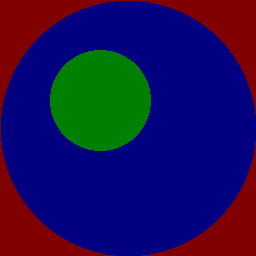
Now we fill the figure above starting from various positions.
>B=floodfill(A,10,240,rgb(0.5,0,0),0.5);
>B=floodfill(B,10,10,rgb(0.5,0,0),0.5);
>B=floodfill(B,150,60,rgb(0,0.5,0),0.5);
>B=floodfill(B,200,200,rgb(0,0,0.5),0.5);
>insrgb(B);